 KEEP
KEEPHow to save Instagram Reels for later, so you really come back to them
Tap the bookmark icon under a Reel and Instagram files it in your private Saved list. Group saves into Collections, or copy the Reel's link into a notes app or KEEP. Saving takes a second. The part that matters is adding a reason, so the Reel has a job when you reopen it.
Coming soon to iPhone
What is the fastest way to save a Reel?
Tap the bookmark icon under the Reel, on the right side of the action row. Instagram adds the Reel to your Saved list, which only you can see. The original creator is not told, and nothing is posted to your profile. Saved items sit under the Saved entry in your profile menu, and the exact menu path changes between app versions, so look for the word Saved rather than a fixed route.
That one tap is the whole feature. It does not record why you saved the Reel, who it was for or when you planned to use it. After a few weeks the list holds hundreds of items that all look equally important, which is the reason most people stop opening it.
How do I put Reels into Collections?
Collections are folders inside Saved. You can create one the first time you save, or later from the Saved screen. Press and hold the bookmark icon to pick a Collection straight away, which saves a step each time.
Names matter more than the number of folders. "Food" is too wide to act on. "Places to eat in March" or "Reels to remake" tells your future self what to do. A few habits make Collections hold up:
The longer guide on organizing saved Instagram posts goes through a full weekly pass.
- Keep the list short, five to eight Collections at most.
- Name each one after an action or an occasion, not a topic.
- Put a Reel in one Collection only, so you do not have to remember which copy you used.
- Review the Collections once a week and move finished items out.
How do I save a Reel by link?
Open the share arrow under the Reel and choose Copy link. The link works in any app: paste it into a note, a message to yourself or a tool that stores links. This has two advantages over the Save button. The link survives if you leave Instagram, and you can add a sentence next to it.
A good note has three parts: what the Reel is, why you saved it and what you want to do. "Ramen place near the station, go with Max, Friday night" will still make sense in three months. A bare link will not.
Can I save a Reel to my camera roll?
Instagram offers a download option for some public Reels, and creators can switch it off. Availability depends on the account and your region, so check the share menu on the Reel itself. If it is missing, the creator or the app has not allowed it, and screen recording someone else's video is a poor workaround. It makes a large file, drops the original quality and ignores the creator's choice. A saved link is usually enough.
Which method fits which kind of Reel?
Different Reels need different handling. The table shows the pattern most people settle into.
| What the Reel is | Best way to save | Why |
|---|---|---|
| A recipe or workout you may try | Save button plus a Collection | Instagram keeps the Reel playable |
| A place you want to visit | Copy link with a note | The note holds the area and who comes along |
| A video format you want to remake | Copy link into an app that tracks ideas | You need hooks and shots, not just the clip |
| Something to send a friend | Share arrow, direct message | Sending is the action |
| Pure entertainment | Do not save | It will not be missed |
What happens when saved Reels pile up?
The list grows faster than you act on it, because saving is easier than doing. Sorting by date or creator still does not tell you which Reel is worth an evening. Two fixes work. Cut the list down: open Saved once, delete everything you cannot explain, and keep only what has a clear next step. Then change the habit: attach a reason at the moment of saving.
The reasons are short verbs. Try, go, buy, remake, send, learn, remember. If you cannot pick one, the Reel probably does not matter.
How does KEEP handle saved Reels?
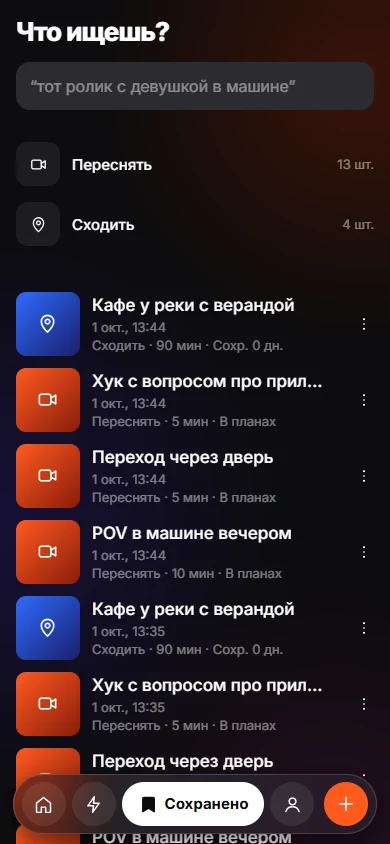
KEEP is an iPhone app, still in development, built around the reason step. You copy the Reel's link, open KEEP, tap + and paste. KEEP shows a preview and may add an "AI found" line, such as a place or the number of people in the video. Then you tap why you want it: Recreate, Go, Try, Get, Use, Learn, Send or Remember. If you are unsure, Just Keep puts it in the Inbox.
KEEP does not have a share-sheet button yet, so from Instagram you copy the link first. Afterwards, the Today and Do tabs sort items into Now, This week and Later and show "Why now?" on each card. You can also search by memory with a phrase like "that reel with a girl driving". Details of the saving step are in save with a reason.
KEEP keeps items on its server under a random device ID, and there is no account. The privacy page lists what is stored.
A routine that takes five minutes
Skipping an item twice is information. You were not that interested, and letting it go is a legitimate result.
- Save freely during the day, with the bookmark or the link.
- Once a day, open the list and give each new item a verb or delete it.
- Pick two items for the weekend and give them a day.
- On Sunday, delete anything you skipped twice.
What should the note say?
The note is the cheapest part of the habit and the one that pays off most. Write in the words you would use to search for it later, and include the next step. Three examples show the range:
Each has a subject, a time or condition and a verb. When you open the list on a free evening, you can decide in seconds instead of watching the Reel again to remember why it mattered.
- "Pasta recipe, 20 minutes, cook Thursday with Anna."
- "Hook idea: starts with the ending, remake for the cafe video."
- "Hiking trail near the lake, go when the weather clears, bring boots."
Common mistakes with saved Reels
Most people hit the same four problems, and all of them are fixable.
- Saving as a reflex. If a Reel makes you feel something for two seconds, it is entertainment. Save only when you can name a next step.
- One giant Saved list. Without Collections or reasons, the list becomes a feed of old items.
- Never revisiting. A list you open once a quarter is a storage unit. Put a weekly slot in your calendar.
- Saving the same idea five times. If you already have three pasta Reels, you have enough. Cook one before saving another.
Frequently asked questions
How do I save a Reel on Instagram without the creator knowing?
Use the bookmark icon under the Reel. Saves are private, and the creator does not get a notification. Creators may see an aggregate save count in their own insights, but not who saved.
How do I save Instagram Reels to a folder?
Instagram calls folders Collections. Press and hold the bookmark icon to choose a Collection, or open the Saved screen, create a Collection and add posts to it.
Do saved Reels disappear if the creator deletes them?
Yes, usually. A saved Reel is a pointer to the post, not a copy. If the creator deletes the post or makes the account private, it can vanish from your Saved list.
Can I save a Reel for offline viewing?
The Save button does not store the video on your phone. Offline access needs a downloaded file, which only some Reels allow.
Does saving a Reel affect what Instagram recommends?
Instagram says it uses engagement signals to rank content, and a save is one kind of engagement. Exact weights are not published.
Keep exploring
How to Organize Saved Instagram Posts So You Use ThemCollections help you find posts. A reason and a weekly review help you use them.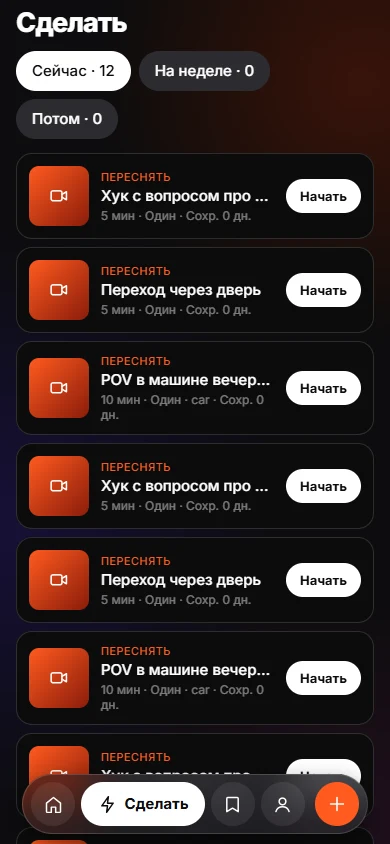 Why We Save Things and Never Do ThemSaving feels like progress. Without a reason and a trigger, nothing brings the item back.Save With a ReasonEight intents, one tap. Your reason stays yours; the AI only observes.Today and DoToday and Do sort saves into Now, This week and Later, with a reason on every card.