 KEEP
KEEP15 hook ideas for Reels and short videos, with example lines
A hook is the first line or image of a short video that gives viewers a reason to stay. Good hooks promise something specific: a result, a mistake, a surprise or a question. Below are 15 formulas with example lines and a way to collect hooks so you reuse them.
Coming soon to iPhone
What is a hook in a Reel?
It is the opening few seconds, in words, picture or both, that tells the viewer why this video is worth watching. Platforms do not publish a fixed rule, but viewers decide quickly whether to keep watching, so the first lines carry weight. A strong hook is concrete, relevant to a specific viewer and linked to the payoff later in the video.
The examples below are formulas. Rewrite them for your topic and your voice. Copying a line word for word makes your video sound like everyone else's.
15 hook formulas
Two or three of these will suit your subject. Test them, not all fifteen.
- Result first. Show the end before the process. "This is the kitchen I built for under a month's rent."
- The mistake. Name an error. "The biggest mistake in saving recipes is saving them."
- The number. Give a count or a time. "Three habits that stopped my screenshot pile."
- The question. Ask something the viewer wants answered. "Why do you never cook the recipes you save?"
- The contrarian line. Disagree with common advice. "Stop making a morning routine."
- The challenge. "I did one saved thing a day for a week."
- The reveal. "Wait until you see the last shot."
- The before and after. Start with the messy version.
- The secret. "A setting most people never touch."
- The warning. "Do not buy this before you watch."
- The story start. "Last week my phone showed 4,000 screenshots."
- The pattern interrupt. An unusual image, sound or action in the first second.
- The direct address. "If you save recipes and never cook them, this is for you."
- The comparison. "Cheap versus expensive, can you tell?"
- The permission. "You are allowed to skip this step."
What makes a hook work?
Three qualities appear again and again.
Match the spoken line to the first image. A strong sentence over a dull shot is wasted, and so is a striking image with no words.
- Specific. A real number or object beats a vague promise.
- Relevant. It speaks to one kind of viewer, who thinks "that is me".
- Honest. The video delivers what the hook promised. A hook that misleads costs trust and watch time.
How do I write a hook for my own topic?
Use a fill-in routine that takes five minutes.
Then film the first shot to match. If you struggle to write the hook, the video idea may be too vague.
- Write what the viewer gets at the end in one sentence.
- Pick the part that would surprise or help most.
- Pick a formula from the list.
- Write three versions of the first line, each under ten words.
- Say them out loud and choose the one that sounds natural.
How do I build a swipe file of hooks?
A swipe file is a collection of examples you reuse for inspiration. It is how professionals avoid the blank page. Whenever a video stops your thumb, save it and write why. Use one line: "Hook: question over a close-up, then a number." Over a month, you gather a set of patterns that work for your audience and your style.
Keep it small and labeled. Fifty saved videos with no notes are useless. Twenty with a note each are a toolkit. The guide to saving Reels for later covers ways to store them, and how to recreate a viral video shows how to turn one into your own.
Where does KEEP fit?
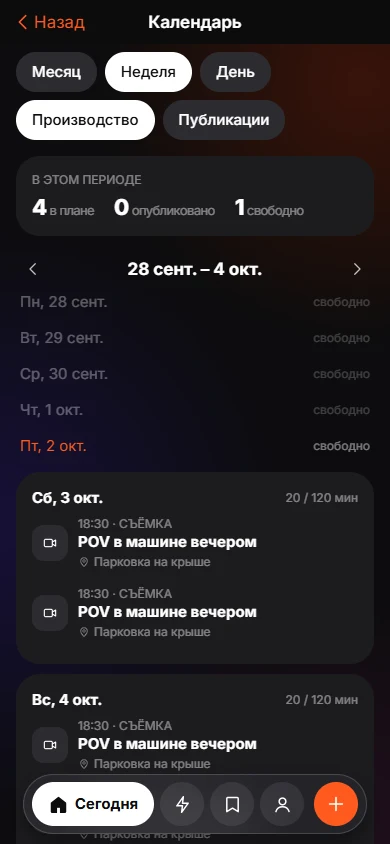
KEEP is an iPhone app in development, with a Creator Mode switch. Creator memory is a list of rules in your own words, grouped as Hooks, Editing, Shots, Posting and Other. You type them yourself, such as "question hooks over a close-up". You can edit a rule, switch it off or forget it, and KEEP shows your rules when you build a video, so a lesson from last month appears when you need it.
The Build from saves screen assembles a video from items you saved. It proposes four parts, Hook, Shot, Edit and CTA, with an "Inspired by" link to the save each part came from. If nothing fits a part, the screen says so and suggests saving an example. The text of the plan is a draft from the server's language model and can be wrong. See Creator Mode.
Common hook mistakes
- Starting with "Hey guys" or a greeting that delays the point.
- Explaining the topic before the promise.
- Hooks that need the caption to make sense.
- Overpromising, such as "this will change your life".
- Changing the hook after the video is finished, so the spoken line and visuals no longer match.
How do I test hooks?
Film two openings for the same video and post them on different days, or in different formats. Compare how many viewers stay past the first few seconds, using the retention graph in your platform's analytics. Keep a note of what you changed. Over ten videos, patterns appear. One test teaches little, because a topic, a time of day or a trend can change results.
Which formula suits which topic?
Different topics lean on different openings, and matching them saves time. Tutorials work with the result first or the number. Opinions and advice work with the contrarian line and the warning. Stories work with the story start and the reveal. Product and recipe videos work with before and after, and the comparison. Pick a formula by the job the video has to do, not by what is popular this week.
Frequently asked questions
What is a good hook for a Reel?
A short, specific opening that promises a result, a mistake, a surprise or an answer, and that matches the first image on screen.
How long should a hook be?
Under about ten words, spoken in the first two or three seconds. Shorter is easier to follow.
Do hooks work the same on TikTok and Reels?
The formulas work on both. Audience tone differs a little, so adjust wording and pace to the platform.
Where can I find hook ideas?
Videos that stopped you scrolling. Save them with a note on why. Your own swipe file beats any generic list.
Should the hook be in the caption too?
A clear caption helps search and clarity, but the video must work without reading it.
Keep exploring
 Creator ModeBuild from saves, batch shoots and a Plan, Shoot, Edit, Publish, Review calendar.How to Save Instagram Reels for LaterThree ways to save a Reel on iPhone, what each one is good for, and a habit that keeps saved Reels from piling up.