 KEEP
KEEPHow to recreate a viral video in your own way, step by step
To recreate a viral video, take the format apart into four pieces: the hook, the shots, the edit and the call to action. Keep the structure, replace the subject, words and visuals with your own, and credit the idea if it is clearly someone else's. Then film it in one session.
Coming soon to iPhone
What does it mean to recreate a video?
It means borrowing a format, not the content. A format is the repeatable structure behind a video: how it opens, how it moves from shot to shot, how it ends. Your version uses the same structure for your topic, your place and your voice. Copying a creator's footage, script or distinctive joke is different, and it is both weaker and risky. Formats are common ground, and creators build on each other all the time.
A simple test: if someone put the two videos side by side, would the structure match while the subject, wording and visuals differ? Then you have recreated the format.
Step 1: Pick a video worth recreating
Choose one where you can say why it worked. Perhaps the first line made you stay, the cuts matched the beat, or the ending gave a reason to share. Avoid videos that depend on a rare asset, like a famous guest or an expensive location, because you cannot match those.
Save the video the moment you decide. The guide to saving Reels for later covers the options. Add a note: "Recreate: hook is a question, three cuts, ends on a reveal."
Step 2: Break it into four parts
Watch the video three times and note:
Write each part in a line. Pausing the video on each cut makes this fast. A 20-second video usually has five to eight shots.
- Hook. What happens in the first two seconds, spoken and visual?
- Shots. How many distinct shots are there, how long is each and what is in the frame?
- Edit. Where are the cuts, text overlays, zooms, sound effects and music changes?
- Call to action. How does it end: a question, a follow prompt, a loop back to the start?
Step 3: Translate it to your subject
Now rewrite each part for you. If the original hook was "I tried X for 30 days, here is what happened", yours might be "I cooked from my saved posts for a week". Keep the structure, change the content.
Make a small table before you film:
| Part | Original | Your version |
|---|---|---|
| Hook | Question over a close-up | Question over your finished dish |
| Shot 1 | Hands opening a box | Hands opening your fridge |
| Shot 2 | Quick cut to result | Quick cut to plated meal |
| Edit | Cuts on the beat, text at top | Same rhythm, your text |
| CTA | "Want part two?" | Your own closing question |
Step 4: Plan the shoot
List the shots with the location, props and people for each. Group shots by setup so you change location and clothing as few times as possible. If you plan several videos, film them together. The article on content batching explains how.
Check the sound. Trending audio changes quickly and has licensing terms that differ by platform and account type, so check what is allowed on your account before relying on a track.
Step 5: Film, edit and compare
Film each shot a few times and keep the best take. Edit to the same rhythm as the original, then watch both videos back to back. Look for places where your version drags, since pace is the most common difference. Trim until the first two seconds hold attention.
Post it, then record what happened: views, saves, shares and the comment that surprised you. Use the notes for your next attempt.
How does KEEP support this?
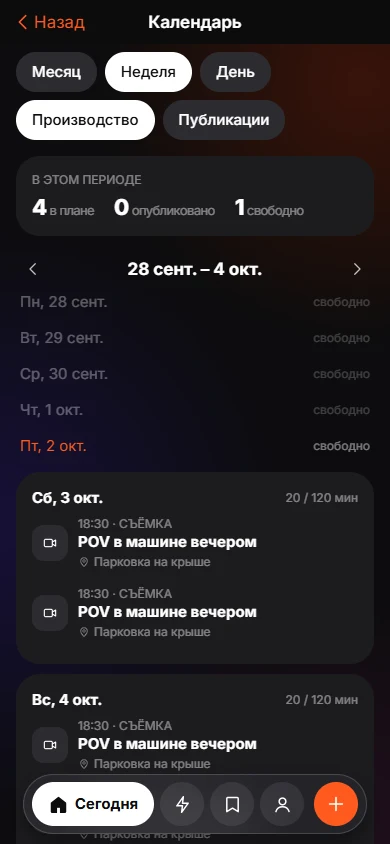
KEEP is an iPhone app, in development, with a Creator Mode switch in Settings for people who save videos to recreate. When you save a video link and choose Recreate, KEEP asks if you want to shoot it, and the video goes to your Do list. For a public link, KEEP's server temporarily fetches the video to read speech and cuts and deletes the file afterwards, keeping only the text analysis.
In Creator Mode, a Build from saves screen lets you type what you are making. KEEP assembles parts from your saved items: Hook, Shot, Edit and CTA, each with an "Inspired by" link back to the save it came from. The script is a draft produced by the server's language model and can be wrong, so treat it as a starting point. When you shoot, KEEP shows one shot at a time as "Shot 1 of N", and you tap "Got it" or press and hold to attach a note such as "camera lower". The Creator Mode page has the full flow.
KEEP plans and reminds. It does not edit, film or publish the video for you.
What are the risks?
Three things to watch. First, copying too closely. Use your own words, places and footage. Second, platform rules on audio and branded content. Third, chasing formats that peaked last month. A format that fits your topic and your voice lasts longer than the one everybody is using today.
A pre-shoot checklist
- Hook written in one sentence.
- Shot list with durations.
- Props, location and light checked.
- Audio chosen and permitted for your account.
- Caption and call to action drafted.
- One backup idea in case the shot fails.
An example from start to finish
Say you saved a Reel that shows a messy desk turning into a tidy one in six cuts, with a text hook: "I had 4,000 screenshots." You break it down. Hook: a number plus a problem. Shots: before wide, three quick tidy-up clips, after wide, a hand holding the phone. Edit: cut on the beat, text at the top. Call to action: "Want my method?"
Your version is about your recipe folder. The hook becomes "I saved 200 recipes and cooked none." Shots: a cluttered phone screen, three quick clips of you picking recipes, a plated meal, the phone with a short list. The structure is the same and nothing else matches. That is a recreation, and the result belongs to you.
Frequently asked questions
Is it legal to recreate a viral video?
Using a format or structure is common practice. Copying someone's footage, script, music or distinctive content can infringe copyright or platform rules. Make your own version.
How long does it take to recreate a short video?
Planning takes 20 to 30 minutes. Filming and editing a 20-second video often takes one to two hours for a beginner.
Should I credit the original creator?
If your idea is clearly inspired by one video, a credit in the caption is polite. It also helps viewers find the source.
How do I find videos worth recreating?
Save the ones you stop scrolling for, and write one line on why. Recreate the format you can explain.
What if my version does not get views?
Compare the first two seconds and the pace. Try again with a stronger hook before you drop the format.
Keep exploring
 Creator ModeBuild from saves, batch shoots and a Plan, Shoot, Edit, Publish, Review calendar.How to Save Instagram Reels for LaterThree ways to save a Reel on iPhone, what each one is good for, and a habit that keeps saved Reels from piling up.