 KEEP
KEEPContent batching for short videos: film once, post all week
Content batching is filming or editing several videos in one block instead of making each from scratch. Group videos by location, outfit and people, shoot them together, then edit in a second block. One session of two to three hours can supply a week of posts.
Coming soon to iPhone
What is content batching?
Content batching is grouping similar work into one block. For video, that means choosing a set of ideas, filming them in a single session and editing them in another. The saving comes from fewer setups. You light the room once, wear one outfit and warm up your voice once, then film five videos instead of one.
The same idea applies to writing captions, designing covers and posting. Creators use it because switching tasks is costly: each switch means finding gear, getting in character and resetting the room.
How do I plan a batch?
Follow a four-step routine.
An example shows the effect. Six ideas might fall into two groups: three videos in the kitchen and three outdoors. Two short sessions beat six mixed ones.
- Collect ideas. Pull four to six ideas from your saves, each one a video you want to make.
- Group by setup. Sort the ideas by location, outfit, props and people. Videos that share setups go in the same session.
- Write a shot list. For each video, list the shots with a rough length.
- Schedule the blocks. Book one filming block and one editing block, and put them in your calendar.
How long should a batch session take?
Aim for two to three hours for four to six short videos, including setup. Longer sessions drain energy, and your last videos suffer. Stop when the energy drops. If you have never batched, start with two videos and see how long it takes. Your personal time per video matters more than an average.
A planning guide for a day:
| Block | Time | What happens |
|---|---|---|
| Setup | 20 minutes | Light, sound check, props |
| Film group A | 60 minutes | Three videos, same location |
| Break | 10 minutes | Water, outfit change |
| Film group B | 60 minutes | Two or three videos |
| Backup | 15 minutes | Copy files, label clips |
How do I avoid overload?
The danger of batching is stacking too much on one day. Set a daily capacity for content work and respect it. Plan 90 to 120 minutes of content work on a normal day, and leave a free day each week. Keep unfinished ideas in a waiting list and move them forward only when a day has room.
When you miss a date, reschedule it, or drop the idea. A calendar full of overdue items is discouraging.
How do I edit in batches?
Editing is a second block. Do all rough cuts first, then all text and captions, then audio and export. Doing each stage for all videos in a row is faster than finishing one video at a time, because you stay in one mode. Label exports with the planned date so you can schedule them in order.
Keep a simple naming habit: date, topic, version. "1014-ramen-v2" is easy to find later.
Does batching make videos worse?
It can, if you lose freshness. Videos about events, trends or news should be filmed close to posting. Batch the evergreen ones, such as tips, recipes and tutorials, and keep a few slots free for timely content. Also vary the settings so a week of videos does not look identical. Change a shirt, a position or the lighting.
How does KEEP help?
KEEP is an iPhone app in development with a Creator Mode switch in Settings. Its shoot sessions group your videos by setup, so you change location or people less. A session card shows an estimate of the minutes saved if you film together, and a button to create the session. See Creator Mode.
The calendar follows each item through Plan, Shoot, Edit, Publish and Review, in Month, Week and Day views. Each day has a default capacity of 120 minutes of content work, and a day card shows minutes used against that number. Items without a date wait in a Flex and trends tray, marked either "this week" or "best within 48h". KEEP offers the first day with room and puts a Shoot button beside each waiting item, but it never moves anything unless you tap. If you miss a date, it asks "Missed it?" and offers Today, Tomorrow, Weekend, Later or Let it go.
KEEP plans and reminds. It does not film, edit or publish for you.
A sample week
A creator posting four videos a week might use this rhythm.
That is about five hours of production for four videos, and the rest of the week stays free for ideas and rest.
- Sunday: pick four ideas from saves and write the shot list (30 minutes).
- Monday: film block (two hours).
- Tuesday: rough edits (60 minutes).
- Wednesday: final edits, captions and covers (60 minutes).
- Thursday to Sunday: post one a day, answer comments and note results.
Mistakes to avoid
- Planning too many videos for the first batch.
- Mixing locations, so setup time eats the savings.
- Skipping the shot list and filming from memory.
- Editing at the same time as filming, which breaks the flow.
- Never looking at results, so every batch repeats the last one.
What gear and prep help most?
Batching rewards preparation more than equipment. A phone, a small tripod and one light source are enough to start. What saves the most time is a prepared set: props laid out the night before, the shot list on your phone, a charged battery and enough free storage. Run a short test clip to check sound before you film a full session, since a bad microphone take ruins an hour.
Write the first line of each video on a card or in a note, and read it before each shot. Reading a hook from a list is faster than inventing it on camera, and it keeps the energy of the session steady.
How do I measure whether batching works?
Track two numbers for a month: hours spent per finished video, and videos posted per week. If both improve, batching is working. If hours per video stay flat, your groups are probably too mixed, so tighten the grouping by location. Note how you feel too. A system that leaves you exhausted by Wednesday needs a lighter schedule.
Frequently asked questions
What is batch filming?
Filming several videos in one session, grouped by location, outfit and people, so you set up once and edit later in a separate block.
How many videos can I batch in one day?
Four to six short videos in two to three hours is a realistic target for most creators. Start with two.
Is batching better than filming daily?
It saves setup time and gives you buffer. Daily filming keeps content fresh. Many creators combine both.
How far ahead should I schedule batched videos?
One to two weeks is common. Keep room for timely topics.
What do I need to start batching?
A list of ideas, a shot list per video, a planned time block and a way to label your clips.
Keep exploring
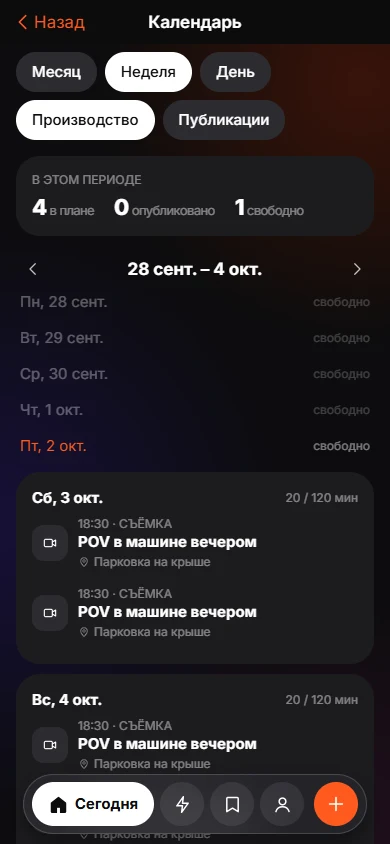 Creator ModeBuild from saves, batch shoots and a Plan, Shoot, Edit, Publish, Review calendar.
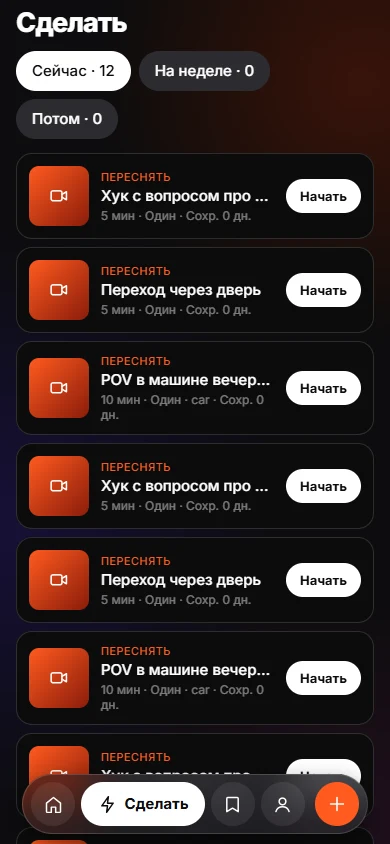 Today and DoToday and Do sort saves into Now, This week and Later, with a reason on every card.