 KEEP
KEEPHow to find saved TikTok videos on your iPhone
Saved TikTok videos live under Favorites on your profile, in the tab with the bookmark icon. Open your profile, tap that tab and choose Videos. Collections group them into folders. If a video is missing, check Likes and Watch history, because the app lists those separately.
Coming soon to iPhone
Where do saved TikTok videos go?
When you tap the bookmark icon on a video, TikTok adds it to your Favorites. To see them, open your profile (the Profile tab at the bottom right), then tap the bookmark icon in the row of tabs under your name. Inside, you will usually see sections for Videos, Collections and other saved items such as sounds and effects. Videos are what you want.
TikTok redesigns these screens regularly, so the labels may differ slightly on your version. The bookmark icon and the word Favorites have stayed stable for years, which makes them the easiest anchors to look for. If your profile shows no bookmark tab, update the app from the App Store and try again.
How do I find videos I liked instead of saved?
A like and a save are separate actions. Liked videos sit in the heart tab on your profile, and you can set that tab to private in the privacy settings. If you cannot find a video under Favorites, check Likes next. Many people tap the heart out of habit and think they bookmarked the video.
Can I see my TikTok watch history?
In many app versions, yes. Open the menu at the top right of your profile, go to Settings and privacy, then Activity center, and look for Watch history. It lists videos you viewed in the past days, which is useful when you did not interact at all. Availability varies by version and region, and TikTok may limit how far back it goes. Check TikTok's Help Center for the current wording.
If you cannot find a video there either, try the creator's profile, a search with a phrase from the caption, or a message thread where a friend sent it. The guide to finding a Reel you watched lists the same trail for Instagram, and most of it applies here.
What are Collections?
Collections are folders inside Favorites. Tap Add to collection when you save a video, or create a collection from the Favorites screen. Naming works best when each collection is an action: "Cook this month", "Trips to plan", "Hooks to try".
Some tips for keeping Collections useful:
- Create the collection first, then save into it, so you never fall back on a single dump.
- Limit yourself to a handful. Ten collections you do not open are worse than three you do.
- Move finished videos out. A collection that only grows is a pile with a label.
- Use the private setting if you do not want others to see what you save.
Why did my saved video disappear?
The most common reasons are simple. The creator deleted it. The creator made the account private. The video was removed for breaking TikTok's rules. In each case TikTok may show a "video unavailable" message in your Favorites. There is no way to bring it back through the app, because Favorites keeps a pointer, not a copy.
A second cause is a change of account. Saves belong to the account you were logged in with, so a second profile or a new login shows a different list. A third is the app itself: after an update or a sign-in problem, the list may need to reload. Pull down to refresh, or log out and in again.
Can I download TikTok videos to my camera roll?
Some videos allow it. Tap Share and look for Save video. Creators can switch this off, and in that case the option does not appear. If the option is there, the video lands in Photos, usually with a watermark. Downloading someone else's video for reposting raises copyright and etiquette questions, so keep downloads for personal reference. For most ideas you do not need the file at all. You need the link and a reason.
How do I save a TikTok so I actually act on it?
Favorites works as a library, but it does not tell you what to do with a video. A better habit is to decide in the moment.
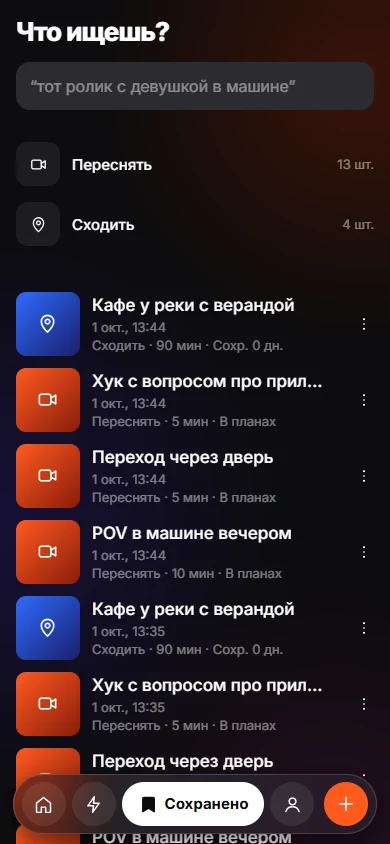
KEEP, an iPhone app still in development, applies this idea in one step. You copy the TikTok link, open KEEP, tap + and paste. You tap why you saved it, from eight options (Recreate, Go, Try, Get, Use, Learn, Send, Remember), or choose Just Keep to decide later. KEEP does not have a share-sheet button yet, so copying the link first is part of the flow. Later you can search by memory with a rough description, and the app tells you why each result matched.
For a public video link, KEEP's server fetches the video briefly to read speech and cuts, then deletes the file and keeps only the text analysis. The privacy page describes it. If you have privacy concerns, use a plain note instead.
- A recipe: save it to a Collection and name the day you will cook it.
- A place: copy the link into a note with the area and who you would go with.
- A video format you want to remake: save the link with a line about the hook.
- A gift idea: send it to the person, or to yourself.
A weekly cleanup for Favorites
Set a recurring time, for example Sunday evening, and run through four steps:
Five minutes of this beats an hour of searching later.
- Open Favorites and sort by the most recent.
- Watch nothing. Decide: act this week, send to someone or delete.
- Move the "act" items into one Collection and put a day on each.
- Remove any video you skipped two weeks in a row.
Frequently asked questions
How do I see my saved videos on TikTok?
Open your profile and tap the bookmark icon in the tab row. Choose Videos to see everything you added to Favorites, or open a Collection to see its contents.
What is the difference between liking and saving on TikTok?
A like is the heart and appears in your Likes tab, which you can make private. A save is the bookmark and goes to Favorites. They are separate lists.
Can other people see my TikTok Favorites?
You control it. Favorites can be set to private, and collections have their own visibility setting. Check your privacy settings before assuming either.
Why does TikTok say my saved video is unavailable?
The creator deleted it, made the account private or the video was removed. Favorites only stores a pointer, so the video cannot be recovered through the app.
Is there a limit to how many TikTok videos I can save?
TikTok does not publish a clear cap on Favorites. The practical limit is how many you can find and use later, which is much lower.
Keep exploring
How to Save Instagram Reels for LaterThree ways to save a Reel on iPhone, what each one is good for, and a habit that keeps saved Reels from piling up.How to Find a Reel You Watched but Did Not SaveA checklist of where a Reel you watched yesterday may still be, and a habit that stops you losing the next one.Find a Saved Link by How You Remember ItSearch saved items by memory, with the match reason shown.