 KEEP
KEEPHow to find a Reel you watched but did not save
Start with places where the Reel left a trace: your Likes, messages you sent or received, the account that posted it and your browser history. Instagram does not promise a full viewing history, so the reliable fix is to save the link the moment you think "I want that again".
Coming soon to iPhone
Can you find a Reel you only watched?
Sometimes. A Reel you watched but never touched leaves very little to search by. Instagram's feed is also not stable: refreshing can replace what you just saw. Whether the app gives you a watch history depends on your version and account, and Instagram changes these screens often, so treat the checklist below as a series of places to look, not a promise.
Work from the cheapest check to the most laborious one. Most Reels turn up in the first three.
Where should I look first?
Go through these in order.
- Likes. If you tapped the heart even once, the Reel is in your activity. In your profile menu, open Your activity and look at Interactions, then Likes. You can sort by date, which narrows a "yesterday" search to a few screens.
- Messages. Reels get forwarded constantly. Open your direct messages and scan the chats where friends send you videos. Searching a chat does not read inside the Reel, but the thumbnail is usually recognizable.
- Comments. Check Your activity for comments you left.
- Saved. You may have saved it without noticing. Open Saved and look at the top, since new saves appear first.
- Accounts you follow. If you remember the creator, open their profile and the Reels tab. Reels are listed newest first.
- The Reel's audio. If you remember a song, tap into any Reel using it and browse other Reels with that audio.
What if I remember only a detail?
Search from the Instagram search bar with the words you saw on screen: a place, a caption phrase or a hashtag. Reels are indexed by caption and by what creators tag, so a distinctive word beats a vague one. "Pasta rooftop Lisbon" is better than "that food video".
If you watched in a web browser signed in to Instagram, that browser's history may hold the Reel's address. Searching the history for "instagram.com/reel" lists every Reel page you opened there. This only works for Reels opened in that browser, and not for what you watched in the app.
Does Instagram keep a watch history?
Do not count on it. Instagram has added and moved activity screens over the years, and the Help Center is the place to confirm what your account offers today. The safe assumption is that a Reel you did not interact with is gone once the feed refreshes.
You can also request a copy of your data from the app's account settings. That download is meant for portability and may include some activity files, but it takes time to prepare and is a slow way to find one video.
How do I stop losing Reels?
The fix is to act in the three seconds after you think "I want this". Choose one:
A Reel with one line of context can be found again. A Reel without it often cannot, even when it is saved. A search through two hundred bookmarked items is the same problem as a search through the feed.
- Tap the bookmark icon. Fast, but the Saved list needs care. See how to save Reels for later.
- Copy the link and send it to yourself in a message. Add a few words about why.
- Copy the link into an app where each item carries a reason.
How does KEEP help find things again?
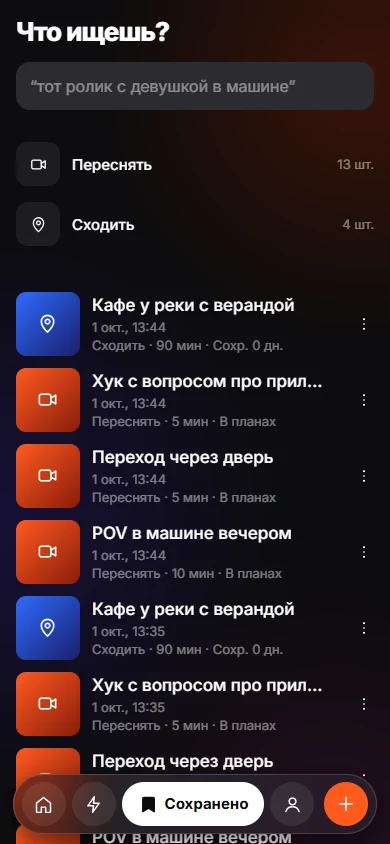
KEEP is an iPhone app, in development, that stores a link or a note with the reason you chose. Its Keeps tab opens with a question, "what are you looking for?", and takes a rough memory such as "that reel with a girl driving" or "restaurant with the red pasta". Each result carries a "Found because" line that names the match: your intent, a place, your note or text read from the item. See search by memory.
Two honest limits. KEEP only knows what you put into it, so a Reel you never saved is not there. And results depend on what was read from the item or what you wrote, so a short note with the words you would remember helps most. KEEP has no share-sheet button yet. You copy the link and open the app.
A habit that works
Pick a trigger that happens anyway, like the moment you feel "I should send this to someone". At that moment, copy the link, paste it where it lives and add three words. It costs ten seconds and removes the whole class of "where was that video" searches.
Keep the note in your own vocabulary. If you will think "the ramen one", write "ramen". Search always works better with the words you will use later than with a perfect description.
What if a friend sent me the Reel?
Then the trail is easier. A forwarded Reel lives in the conversation, and you can scroll to the date you remember. If the chat is long, look at the shared media section of the conversation, where videos and links from both sides are gathered. Ask the friend as well. They may have the original open or remember the account name.
If the Reel came from a group chat, check the other members' forwarding as well, because the same video often circulates more than once. A quick message such as "which reel was that, the one with the dog on the scooter?" gets an answer faster than ten minutes of scrolling.
Mistakes that make a Reel hard to find
These habits cost the most time.
- Searching by your own description rather than by the creator's words. The caption is what Instagram indexes, so guess the caption.
- Scrolling the home feed hoping it returns. The feed is personalized and changes on every refresh.
- Waiting a week. The longer you wait, the more Reels sit on top of the one you want, and your memory of it fades.
- Saving the Reel but giving it no context, then relying on a long Saved list.
Frequently asked questions
How do I see Reels I watched on Instagram?
Check Your activity, then Likes, Comments and Saved. If you did not interact, there may be no record. Instagram changes its activity screens, so confirm in the Help Center.
Can I find a Reel I watched yesterday if I did not like it?
Try the creator's profile, your messages and a search with a caption phrase or place name. Without an interaction, there is often no record of it.
Does clearing the Instagram cache bring back watched Reels?
No. The cache holds temporary files and does not work as a history. Clearing it does not restore or reveal anything you watched.
Can I get a list of every Reel I have watched?
Instagram does not promise one. A data download from account settings may include activity files, but it is not designed as a watch list.
What is the best way not to lose a Reel again?
Save the link with one line of context straight away, in an app you open every day.
Keep exploring
How to Save Instagram Reels for LaterThree ways to save a Reel on iPhone, what each one is good for, and a habit that keeps saved Reels from piling up.How to Organize Saved Instagram Posts So You Use ThemCollections help you find posts. A reason and a weekly review help you use them.Find a Saved Link by How You Remember ItSearch saved items by memory, with the match reason shown.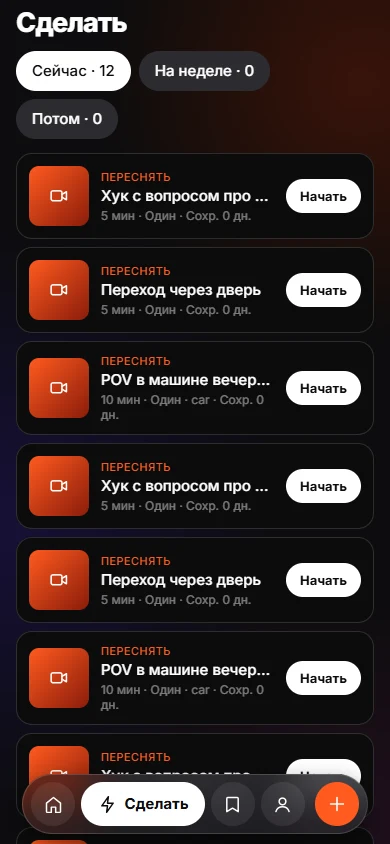 Why We Save Things and Never Do ThemSaving feels like progress. Without a reason and a trigger, nothing brings the item back.