 KEEP
KEEPApple Notes vs Reminders: where should a saved idea go?
Use Reminders for anything with a date, a place or a person attached, and Notes for information you will look up. A saved idea with no deadline sits between the two. Decide by one question: will you need a nudge, or will you need the details?
Coming soon to iPhone
What is the difference between Notes and Reminders?
Notes is for information. Reminders is for actions. Notes gives you free-form text, checklists, photos, scans and links, all in a document you search and edit. Reminders gives you tasks that can have a due date, a time, a location trigger, a repeat, tags, flags and subtasks, and it alerts you at the right moment.
Both are built into iPhone, both sync with iCloud and both are free. The question is not which one is better. The question is which job your saved item has.
A one-question rule
Ask: do I need to be nudged, or do I need to look this up?
This one question settles most cases in a few seconds.
- If you need a nudge, such as "send Anna the article on Friday", use Reminders.
- If you need to look it up, such as "the measurements for the bookshelf", use Notes.
- If you need both, put the details in a note and set a reminder that links to it.
Side-by-side comparison
| Feature | Notes | Reminders |
|---|---|---|
| Best for | Information, drafts, reference | Tasks and follow-ups |
| Alerts | None by default | Date, time, location, repeat |
| Checklists | Yes, simple | Yes, with due dates and subtasks |
| Attachments and scans | Yes | Limited, with images and links |
| Organization | Folders, tags, smart folders | Lists, tags, smart lists |
| Sharing | Share a note or folder | Share a list, assign tasks |
| Search | Full text | By task title and notes field |
Where should a saved link go?
It depends on the verb. A link you will read goes in Reading List or a notes page. A link you will act on by a date goes to Reminders, with the link pasted in the URL field or the notes field. A link you may use someday goes in a reference note, but only if you can say what it is for in a line.
Saved recipes, restaurants and places sit awkwardly in both apps. A note with sixty restaurant links has no alerts. Sixty reminders are noisy and bury the real ones. The way out is to keep a short list, not to find a better app. See how to turn saved links into a to-do list for the structure.
What are location reminders good for?
Reminders can alert you when you arrive at or leave a place. This suits "buy the book" when you pass the bookshop, or "return the parcel" when you leave work. Use it for items tied to a place. It works poorly for items that depend on mood or company, such as "try the new ramen place with Max".
A hybrid setup that works
Many people end up with a simple two-app system.
This keeps Reminders clean, since only committed items go there, and keeps Notes full of context.
- Notes holds three notes: "Reference", "Ideas" and "Do this". Ideas collects saved links with a line about why. "Do this" is a short list of what you plan to do.
- Reminders holds only dated items: one list called "This week", one called "Waiting for".
- Every Sunday, you move two items from Ideas to Reminders with a day.
When does neither work?
The trouble appears when you save a lot of links, reels and screenshots from social apps. Notes becomes a dump, and Reminders is the wrong shape. You need a layer that records why you saved an item and shows it when you can act. The guide to organizing notes covers the tidy-up, and the same limits apply.
KEEP, an iPhone app in development, is built for this layer. Each save gets one of eight reasons: Recreate, Go, Try, Get, Use, Learn, Send or Remember. KEEP then asks whether you really want to do it, and only a yes goes to the Do tab. That tab sorts items into Now, This week and Later, and shows minutes, company and place. You can set a date or ask for a reminder, and notifications only appear if you allow them. KEEP does not replace Reminders for ordinary chores. It handles the pile of inspiration that Reminders was never meant for. See Today and Do.
What about the Apple Reminders widgets?
A Reminders widget on the home screen shows today's tasks, and a Notes widget can pin a single note. Used together, the widgets keep the two lists visible without opening either app. Put the "Do this" note and "Today" reminders on the first screen. What you see daily tends to get done.
Common mistakes
- Using Reminders as a storage place and ignoring alerts, so every task is overdue.
- Writing tasks in Notes with no dates, then never opening the note.
- Setting a reminder without a clear first step. "Taxes" is vague. "Find last year's tax return" is a start.
- Duplicating a task in both apps, then updating only one.
Five examples to try today
Concrete cases make the rule easier to apply.
The pattern repeats: details live in one place, and the nudge lives in another, with a link between them. It takes two taps more than a single app, and it keeps both lists honest.
- "Return the jacket by Friday." Reminders, with a due date and a location alert for the shop.
- "Wi-Fi password and router model." Notes, because you will look it up, not be nudged about it.
- "Plan Mum's birthday dinner." A note for the guest list and ideas, plus a reminder four weeks before with a link to the note.
- "Read that article on sleep." Reading List, or a reminder only if you want a time slot for it.
- "Try the ramen place from the reel." A line in an Ideas note until you pick a day, then a reminder with the day and the link.
How often should I review both?
Once a week for ten minutes. Open Reminders and clear what is overdue: do it, move it or delete it. Open the Ideas note and promote two items. A system you review stays small, and one you ignore grows quietly until you stop trusting it. Put the review in your calendar as a repeating event so it does not depend on memory.
Frequently asked questions
Should I use Notes or Reminders for to-do lists?
Use Reminders for tasks that need a date or alert, and Notes for lists you will check manually, such as packing or shopping.
Can Reminders store links?
Yes. Add a link in the URL field or the notes field of a reminder. Notes handles links better when you need context around them.
Can I link a note to a reminder?
You can paste a link to the note in a reminder's notes field, or add the note's content to the reminder. This is a manual step.
Which is better for shopping lists?
Either. Reminders is good for shared lists with checkboxes and sorting by aisle in some regions. Notes is good for a quick personal list.
Where should I keep ideas I might never do?
In a single Ideas note with a line of context for each. Review it monthly and delete anything stale.
Keep exploring
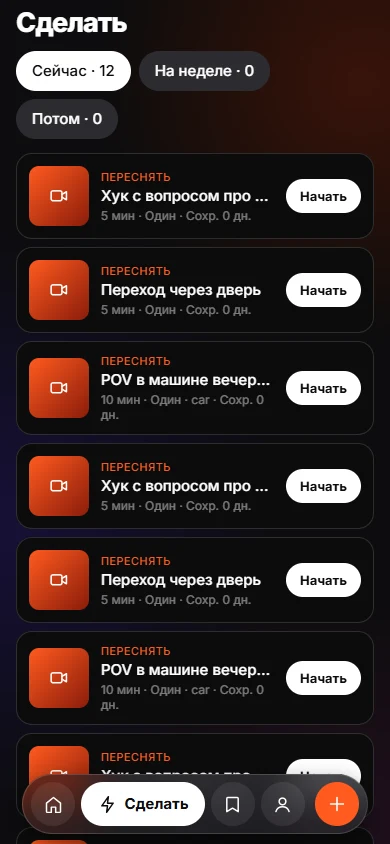 Today and DoToday and Do sort saves into Now, This week and Later, with a reason on every card.